Buy فرکانس.com ?
We are moving the project
فرکانس.com .
Are you interested in purchasing the domain
فرکانس.com ?
domain@kv-gmbh.de · 0541-91531010
Buy فرکانس.com ?
Where can one download Phantom Gaming Tweak?
Phantom Gaming Tweak can be downloaded from the official ASRock website. Users can visit the ASRock website, navigate to the support section, and search for Phantom Gaming Tweak in the software downloads. Once located, users can download the software onto their computer to optimize their ASRock Phantom Gaming hardware. **
How do I install ASUS GPU Tweak?
To install ASUS GPU Tweak, you can follow these steps: 1. Visit the ASUS official website and navigate to the support page. 2. Search for the GPU Tweak software and download the latest version compatible with your graphics card. 3. Run the downloaded file and follow the on-screen instructions to install the software on your computer. 4. Once the installation is complete, you can launch ASUS GPU Tweak and start customizing your graphics card settings for optimal performance. **


Similar search terms for Tweak
Top-Angebote
Products related to Tweak:
-
Frequency Stripe Wallpaper in Greys & YellowsMultiple stripes are brushed with vigorous speed to create vibrancy in this design. This stripe has a, Zen-like, relaxed quality that could create a calming atmosphere. Add dimension to your space with this design.50,12 $*Shipping: 0,00 $Secure redirect to the provider
-
Uplift Picks Ultrasonic Jewelry Cleaner Portable High Frequency Cleaning Machine Ultrasonic Jewelry Cleaner Portable High Frequency Cleaning MachineBring back the shine to your everyday items with this ultrasonic jewelry cleaner designed for effortless deep cleaning. Using high frequency vibrations, it removes dirt and buildup from hard to reach areas without harsh scrubbing. Compact and easy...56,98 $*Shipping: 0,00 $Secure redirect to the provider
-
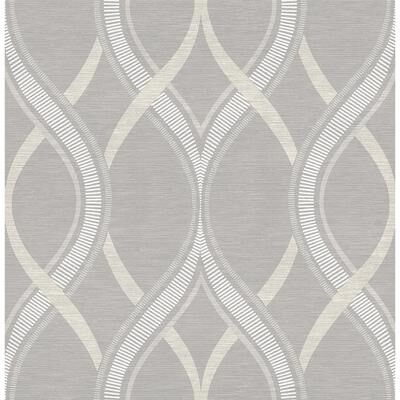
A-Street Prints Frequency Grey Ogee WallpaperRecreate the look of your room with this elegant and mod wallpaper design. A warm grey texture topped with a swirling ogee geometric, brings depth and dimension to walls featuring chic raised inks for the perfect finishing touch.100,03 $*Shipping: 0,00 $Secure redirect to the provider



-
Why won't ASUS GPU Tweak II open?
ASUS GPU Tweak II may not open due to several reasons, such as compatibility issues with the operating system, corrupted installation files, or conflicts with other software. It is also possible that the program is being blocked by antivirus or firewall settings. To troubleshoot the issue, try reinstalling the software, ensuring that your system meets the minimum requirements, and checking for any conflicts with other programs or security settings. If the problem persists, contacting ASUS support for further assistance may be necessary. **
-
What is a question about Asus GPU Tweak?
One possible question about Asus GPU Tweak could be: "How can I use Asus GPU Tweak to optimize the performance of my graphics card for gaming?" This question could lead to a discussion about the various features and settings within the software that can be adjusted to enhance gaming performance, such as overclocking, fan speed control, and monitoring system information. **
-
Why does Cydia not work after installing a tweak?
Cydia may not work after installing a tweak due to compatibility issues between the tweak and the Cydia application. The tweak may have caused a conflict or error within Cydia, preventing it from functioning properly. In some cases, the tweak may have altered important system files or settings that are necessary for Cydia to operate correctly. Rebooting the device or uninstalling the problematic tweak may help resolve the issue and allow Cydia to work again. **
-
Why is Cydia not working after installing a tweak?
Cydia may not be working after installing a tweak due to compatibility issues with the tweak and the device's operating system. The tweak may not be fully compatible with the version of iOS or jailbreak tool being used, causing conflicts and malfunctions within Cydia. Additionally, the tweak may have caused a system error or corruption, leading to Cydia not functioning properly. It is important to carefully research and ensure the compatibility of a tweak before installing it to avoid these issues. **


Is there a Pokemon Go Coins Tweak for Cydia?
Yes, there are several Pokemon Go Coins tweaks available for Cydia. These tweaks allow users to modify the game to earn more coins or access premium features without having to spend real money. However, it's important to note that using these tweaks may violate the game's terms of service and could result in consequences such as account suspension or banning. It's always best to use caution and consider the potential risks before using any game tweaks. **
I need help with the optimal GPU tweak settings for Asus.
To optimize GPU tweak settings for Asus, you can start by using the Asus GPU Tweak II software. Within the software, you can adjust settings such as core clock, memory clock, fan speed, and power target to enhance performance. It is recommended to gradually increase these settings while monitoring temperature and stability to find the optimal balance between performance and stability for your specific GPU model. Additionally, you can refer to online forums and guides for specific recommendations tailored to your GPU model. **
Top-Angebote
Products related to Tweak:
-
Inspired Deals Digital Transceiver For Low Latency Drone Video Transmission Stable Signal Module Digital Transceiver For Low Latency Drone Video Transmission Stable Signal ModuleTake control of every flight with confidence and clarity. This DJI Neo 2 digital transceiver is designed for drone enthusiasts and professionals who demand smooth, realtime video transmission without frustrating delays. Whether you're capturing...64,97 $*Shipping: 0,00 $Secure redirect to the provider
-
Atlas Lighting and Home Atlas Amplitude Pale Pink Marbled Glass VaseThe Amplitude large vase is made from glass and features a ridged design in a pale pink marbleized finish. This piece is ideal for subtly introducing a light, feminine color palette to a chic, modern interior.38,99 $*Shipping: 0,00 $Secure redirect to the provider
-
Frequency Stripe Wallpaper in Greys & YellowsMultiple stripes are brushed with vigorous speed to create vibrancy in this design. This stripe has a, Zen-like, relaxed quality that could create a calming atmosphere. Add dimension to your space with this design.50,12 $*Shipping: 0,00 $Secure redirect to the provider
-
Uplift Picks Ultrasonic Jewelry Cleaner Portable High Frequency Cleaning Machine Ultrasonic Jewelry Cleaner Portable High Frequency Cleaning MachineBring back the shine to your everyday items with this ultrasonic jewelry cleaner designed for effortless deep cleaning. Using high frequency vibrations, it removes dirt and buildup from hard to reach areas without harsh scrubbing. Compact and easy...56,98 $*Shipping: 0,00 $Secure redirect to the provider
-
Where can one download Phantom Gaming Tweak?
Phantom Gaming Tweak can be downloaded from the official ASRock website. Users can visit the ASRock website, navigate to the support section, and search for Phantom Gaming Tweak in the software downloads. Once located, users can download the software onto their computer to optimize their ASRock Phantom Gaming hardware. **
-
How do I install ASUS GPU Tweak?
To install ASUS GPU Tweak, you can follow these steps: 1. Visit the ASUS official website and navigate to the support page. 2. Search for the GPU Tweak software and download the latest version compatible with your graphics card. 3. Run the downloaded file and follow the on-screen instructions to install the software on your computer. 4. Once the installation is complete, you can launch ASUS GPU Tweak and start customizing your graphics card settings for optimal performance. **
-
Why won't ASUS GPU Tweak II open?
ASUS GPU Tweak II may not open due to several reasons, such as compatibility issues with the operating system, corrupted installation files, or conflicts with other software. It is also possible that the program is being blocked by antivirus or firewall settings. To troubleshoot the issue, try reinstalling the software, ensuring that your system meets the minimum requirements, and checking for any conflicts with other programs or security settings. If the problem persists, contacting ASUS support for further assistance may be necessary. **
-
What is a question about Asus GPU Tweak?
One possible question about Asus GPU Tweak could be: "How can I use Asus GPU Tweak to optimize the performance of my graphics card for gaming?" This question could lead to a discussion about the various features and settings within the software that can be adjusted to enhance gaming performance, such as overclocking, fan speed control, and monitoring system information. **
Similar search terms for Tweak
-
A-Street Prints Frequency Grey Ogee WallpaperRecreate the look of your room with this elegant and mod wallpaper design. A warm grey texture topped with a swirling ogee geometric, brings depth and dimension to walls featuring chic raised inks for the perfect finishing touch.100,03 $*Shipping: 0,00 $Secure redirect to the provider
-
Killer Frequency (Xbox Series X / Xbox One)Killer Frequency for Xbox Series X and Xbox One is a gripping narrative-driven horror adventure set in a small-town radio station during the late 1980s. As a late-night radio host, you must guide callers through terrifying situations, making critical decisions that determine who lives and who dies, all while uncovering the mystery behind a ruthless serial killer on the loose. Key Features Story-driven horror adventure with multiple branching outcomes Set in a nostalgic 1980s small-town radio station Decision-based gameplay where choices directly impact survival Atmospheric tension with voice acting and immersive sound design Puzzle-solving elements combined with real-time decision making Stylised visuals inspired by classic slasher films Optimised performance across Xbox Series X and Xbox One Benefits Experience a highly immersive horror narrative shaped by your choices Replayable storyline with multiple endings Perfect blend of suspense, storytelling and puzzle gameplay Ideal for players who enjoy psychological horror over jump scares Accessible gameplay with deep narrative consequences Specifications Table Specification Details Platform Xbox Series X / Xbox One Genre Narrative Adventure / Horror Game Mode Single Player PEGI Rating 16 Developer Team17 Digital Publisher Team17 Format Physical Disc Language English Compatibility Xbox Series X, Xbox One12,24 £*Shipping: 0,00 £Secure redirect to the provider
-
Uplift Essentials Cordless Ultrasonic Cutter 40kHz High Frequency Precision Craft Tool Cordless Ultrasonic Cutter 40kHz High Frequency Precision Craft ToolExperience the future of fabrication with a tool that slices through tough materials as if they were butter. This cordless ultrasonic cutter utilizes a highfrequency vibration of 40,000 cycles per second (40kHz) to reduce friction between the blade...591,97 $*Shipping: 0,00 $Secure redirect to the provider
-
Why does Cydia not work after installing a tweak?
Cydia may not work after installing a tweak due to compatibility issues between the tweak and the Cydia application. The tweak may have caused a conflict or error within Cydia, preventing it from functioning properly. In some cases, the tweak may have altered important system files or settings that are necessary for Cydia to operate correctly. Rebooting the device or uninstalling the problematic tweak may help resolve the issue and allow Cydia to work again. **
-
Why is Cydia not working after installing a tweak?
Cydia may not be working after installing a tweak due to compatibility issues with the tweak and the device's operating system. The tweak may not be fully compatible with the version of iOS or jailbreak tool being used, causing conflicts and malfunctions within Cydia. Additionally, the tweak may have caused a system error or corruption, leading to Cydia not functioning properly. It is important to carefully research and ensure the compatibility of a tweak before installing it to avoid these issues. **
-
Is there a Pokemon Go Coins Tweak for Cydia?
Yes, there are several Pokemon Go Coins tweaks available for Cydia. These tweaks allow users to modify the game to earn more coins or access premium features without having to spend real money. However, it's important to note that using these tweaks may violate the game's terms of service and could result in consequences such as account suspension or banning. It's always best to use caution and consider the potential risks before using any game tweaks. **
-
I need help with the optimal GPU tweak settings for Asus.
To optimize GPU tweak settings for Asus, you can start by using the Asus GPU Tweak II software. Within the software, you can adjust settings such as core clock, memory clock, fan speed, and power target to enhance performance. It is recommended to gradually increase these settings while monitoring temperature and stability to find the optimal balance between performance and stability for your specific GPU model. Additionally, you can refer to online forums and guides for specific recommendations tailored to your GPU model. **
* All prices are inclusive of VAT and, if applicable, plus shipping costs. The offer information is based on the details provided by the respective shop and is updated through automated processes. Real-time updates do not occur, so deviations can occur in individual cases. ** Note: Parts of this content were created by AI.